Mega Baccarat
Introduction
Mega Baccarat is an exciting variant of the classic game of baccarat, one of the oldest and most famous casino games in the world. In addition to the standard rules, it includes a mega round with mega multipliers, which is triggered if the dice roll results in an 8 or 9, increasing your chances of winning big.
The objective of the game is to guess who will win (the Player or the Bank) with a hand closest to 9.
How to play
To play, select a stake amount to bet on the Player, the Banker, or a Tie. You can place or modify your bets until the timer runs out.
A 20% mega-odds boost is added to your bets. For example, if your stake is 10, the mega-odds boost will be 2, making your total stake 12.
The mega odds are not included in the minimum and maximum betting limits.
Megaround
Once the timer expires, random mega-multipliers between 2x and 100x are assigned to all bet points. The dice shaker then begins to spin to determine if this round of play will be the Mega Round.
If the dice roll is 8 or 9, the Mega Round is played and the multipliers are activated. Payouts are adjusted by applying the mega multipliers to the corresponding bet points. If your bets cover the winning bet point, you receive the multiplied payout, and your initial bet is added to your winnings. You can win even more if two or more bet points are winners.
Normal round
If the dice roll is neither an 8 nor a 9, a normal round is played and the multipliers disappear. If your bet wins, you will receive the normal payout.
The dealer then deals the four starting cards in the following order: the 1st and 3rd cards to the Player and the 2nd and 4th cards to the Banker. When the betting timer expires, the dealer scans the four starting cards dealt to the Player and the Banker, starting with the Player.
If either side needs a third card, the dealer deals this additional card according to the Third Card Rule , which is explained below.
Once all the necessary cards have been dealt to each hand, the round ends. The side with the hand closest to 9 wins. If both hands have the same value, the round ends in a tie.
Winning bet points are highlighted, and you receive your payout based on the type of bet you placed. Winnings are displayed on the screen.
When the game round is over, all the cards on the table are collected and discarded, and the betting for the next round is opened.
Value of the cards
The game is played with 8 standard decks of 52 cards.
In this game, only the numerical value of each card is taken into account; the suit of the cards (diamonds, hearts, spades, or clubs) is irrelevant.
| Cards | TO | 2 | 3 | 4 | 5 | 6 | 7 | 8 | 9 | 10 | J | Q | K |
|---|---|---|---|---|---|---|---|---|---|---|---|---|---|
| Points | 1 | 2 | 3 | 4 | 5 | 6 | 7 | 8 | 9 | 0 | 0 | 0 | 0 |
The value of the Player's and Banker's hands is calculated by adding the points of the cards.
The maximum possible score is 9. The value of each hand is calculated by subtracting ten points from a hand that would otherwise be worth 10 or more.
For example:
5 + 5 = 10 – 10 = 0
8 + 7 = 15 – 10 = 5
J + K = 0
1 + 5 + 8 = 14 – 10 = 4
8 + Q = 8
9 + 9 = 18 – 10 = 8
The third card rule
There are three cases in which a game round ends after dealing 4 cards (small hand) without the need for additional cards:
- The first two cards of the Player or the Bank add up to 8 or 9 points in total (natural hand).
- The Player scores 6 points and the Bank 7 or vice versa.
- There is a tie with 6, 7, 8 or 9 points.
If the Player and the Banker receive an initial two-card hand with a value of 0–7, the Third Card Rule is consulted to determine whether the third card is dealt to either hand. The Player always goes first.
To steal the Player's hand:
| If the Player's two cards add up to: | Action |
|---|---|
| 0, 1, 2, 3, 4, 5 | The Player draws a third card |
| 6, 7 | The player stands his ground. |
| 8, 9 (Natural) | They both stand up |
So that he steals from the bank:
| Two initial cards from the Bank | Value of the third card the Player draws | ||||||||||
|---|---|---|---|---|---|---|---|---|---|---|---|
| There is no third letter | 0 | 1 | 2 | 3 | 4 | 5 | 6 | 7 | 8 | 9 | |
| 0 | R | R | R | R | R | R | R | R | R | R | R |
| 1 | R | R | R | R | R | R | R | R | R | R | R |
| 2 | R | R | R | R | R | R | R | R | R | R | R |
| 3 | R | R | R | R | R | R | R | R | R | P | R |
| 4 | R | P | P | R | R | R | R | R | R | P | P |
| 5 | R | P | P | P | P | R | R | R | R | P | P |
| 6 | P | P | P | P | P | P | P | R | R | P | P |
| 7 | P | P | P | P | P | P | P | P | P | P | P |
| 8 | P | P | P | P | P | P | P | P | P | P | P |
| 9 | P | P | P | P | P | P | P | P | P | P | P |
R - To steal; P - To stand up for oneself
If the Player's first two cards add up to 6 or 7 points in total, but the Banker's first two cards add up to 0, 1, 2, 3, 4 or 5 points in total, the Banker has to draw an extra card.
Top bets
The main bets are Player, Banker, and Tie. The hand with the highest total card value wins. If the Player and Banker have the same total card value, it's a Tie; you win if you bet on a Tie.
Bets can be placed in the betting box shown on the screen.
A winning bet on the Player pays 1-100:1 .
A winning bet on the Banker pays 1-100:1 *.
A winning bet on a Draw pays 8-800:1 . In the event of a draw, bets on the Player and the Banker are not lost, but returned.
*95% of your bet on the bank is returned if the bank wins.
Bets on Player and Bank betting points may be subject to opposing bet blocking.
Side bets
In addition to the main bets, you can also place optional side bets. You can place any or all of the side bets in the same round of play.
- Player's partner
- Banking couple
Bet limits apply to all side bets. Additional restrictions may apply to the maximum stake on side bets after a specific number of rounds. This amount cannot exceed a fixed percentage of the main accumulator stakes. See Payouts and Limits for more information.
When additional restrictions are placed on the maximum bet, placing a main bet becomes a requirement in order to place side bets.
Player's partner and banker's partner
A Player Pair side bet wins if the Player's first two cards form a pair, and a Banker Pair side bet wins if the Banker's first two cards form a pair. Any pair counts for both the Player's and Banker's hands.
- Perfect pair : two identical cards (for example, two kings of hearts).
- Pair of colors : two cards of the same value and color, but of different suits (for example, a 5 of hearts and a 5 of diamonds).
- Mixed pair : two cards of different suits and colors but with the same value (for example, a 7 of spades and a 7 of diamonds).
A winning bet on any type of Player or Banker Pair pays 10-1000:1.
Bet
The table name indicates the table you are currently playing at, and the Table Limits show the minimum and maximum bets allowed at that table.
When you click/tap on this area, the Payouts and Limits window opens, showing the minimum and maximum limits and payout odds for each type of bet.
Mega Baccarat • 1000 COP - 2,500,000
The Game Information Indicator tells you about the game's status.
0246810
13579
You can place bets and modify your bets while the timer is visible on the screen.
The Chips screen allows you to select the value of chips you will use for betting. Only chip values that can be covered by your current balance are available.
1K
5K
10K
25K
125K
500K
1.25M
5M
The Repeat Bet button allows you to repeat the same bets from the previous round. Once you click/tap the Repeat Bet button, the Double Down and Undo buttons will be enabled.
The Double button doubles all bets placed. Each click/tap doubles your bets up to the maximum limit.
The Undo button removes the last bet placed. This button is only available while betting is active. Once bets are settled, you cannot undo or change them. Clicking/tapping the Undo button multiple times will remove bets one by one, with the most recent bet being removed first.
The Balance indicator shows your available funds and currency. Your balance must be sufficient to cover all bets placed.
Balance
1000.00 COP
If your balance is not updated (after betting, losing or winning), refresh the game.
The Cashier button will open the Cashier window for deposits and withdrawals. On mobile devices, the Cashier button is available in the game menu.
The Total Bet indicator shows the total value of all bets placed in the current game round.
Total bet
10.00 COP
All game rounds are identified by a game ID number . The Time indicator displays the current local time.
12:36 ID: 1234567890
Use the item ID number as a reference (or take a screenshot of the item number) if you have any questions and want to contact customer service.
Baccarat Multiplay
Baccarat Multiplay mode lets you play multiple baccarat tables simultaneously in a single window. You can track your progress at each table, analyze game statistics, and select your favorite patterns.
Access to Baccarat Multiplay mode
Baccarat Multiplay mode is available for mobile and desktop devices and can be activated from the Baccarat Lobby or from any Baccarat table.
To access this mode from the Lobby, click or tap the Play button . The Lobby view will change to show you all the baccarat tables available for Multiplay.
After accessing Multigame mode you will see a list with all the baccarat tables available at that time.
To access Baccarat Multiplay from an open table, click or tap the MULTIGAME mode icon.
Multigame mode will start in a small window.
To close the Multigame mode window, click or tap the X.
Once Baccarat Multiplay is launched, a Multigame panel will open with two tabs: All Tables and Good Roads . The All Tables tab opens automatically and displays all available baccarat tables; you can view trends and sort the tables by best streak.

Click or tap the Refresh button to easily sort the tables by best streak for your chosen tracking view. The number highlighted in red indicates the number of new tables with the best streak since the last table list update.
Good Roads
The Good Roads tab displays tables based on predefined or custom winning streak patterns. When a tracked Baccarat table matches any of these patterns, it will appear on this tab. When a table's streak no longer matches the defined patterns, it is removed from the Good Roads tab.
When betting on the All Tables tab, the Good Roads tab will show a notification if a table appears that matches your patterns.
Pattern settings and preferences can be configured in Good Roads Settings .
There are two sections in the Good Roads settings:
- Default : Contains 12 predefined patterns. These patterns cannot be edited or deleted.
- Customized : Here you can add up to 9 patterns created by you.
All patterns are enabled by default and can be turned on or off in the Good Roads settings by clicking or tapping the toggle button below the pattern.

— The pattern is activated

— The pattern is deactivated
Custom Good Roads Creator
The Good Roads Custom Creator lets you create, save, and track custom streak patterns on 6x8 Big Roads grids.
Click or tap on Create new to add a custom pattern.

The first pattern you create will appear as “My Pattern 1”. You can rename, save, delete, and edit patterns using the controls that appear on the grid.
Click or tap on the Bank (red) and Player (blue) buttons to mark the results on your custom grid pattern.


Click or tap the Undo button to revert the last change and be sure to save (check mark) the pattern before exiting.
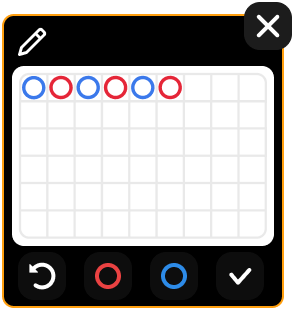
Good Roads Tracking
The Multi-Game function lets you track up to 9 custom patterns and the following 12 preset Good Roads:
Player Streak
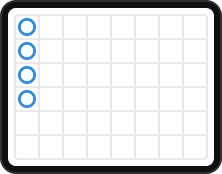
Banking Streak
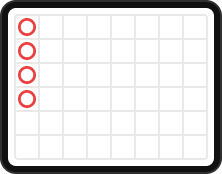
Player's Ping Pong
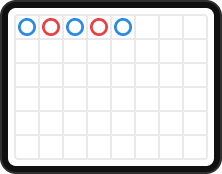
Banking Ping Pong
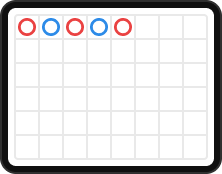
One two of the Player
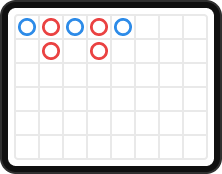
One Two of the Banking
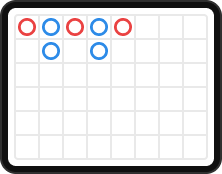
Player Sandwich
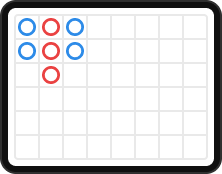
Banking Sandwich
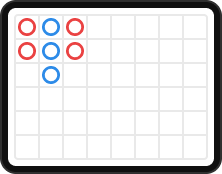
Separated from the Player
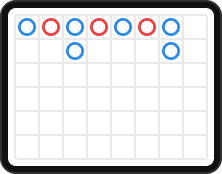
Separated from Banking
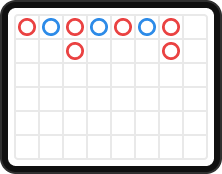
Player Swap
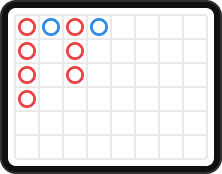
Exchange with Bank
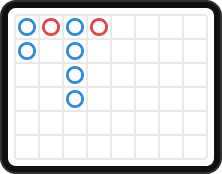
Click or tap the Good Roads Settings button to select the Good Road patterns you want to follow; you will be automatically notified when the selected pattern occurs.
Good Roads Automatic Bet
Good Roads Auto Bet allows you to automatically place bets on a selected number of matches using predetermined or custom patterns.
To set up the Auto Bet feature, click or tap on the Auto Bet button .
Your custom patterns will appear before the default grids, and the last saved pattern will be automatically preselected.
Choose a pattern and place your bet on the player, the banker, or a tie.
Next, select one of the auto-bet options: 10, 25, or 100 matches. Clicking or tapping on one of the options will start the auto-bet feature.
Bets on player and banker betting points may be subject to opposing bet blocking.
The number of matches you have selected will appear as an indicator on the Auto Bet button. The remaining number of matches will be updated automatically.
Once the auto-bet has started, you can modify your bet, change the pattern, and add additional matches by clicking or tapping the Edit button in the Auto-Bet window.
You must save any changes made to your bet or pattern. Click or tap the SAVE button to update your Auto Bet settings.
To stop the Auto Bet feature, open the Auto Bet window and click/tap the panel with the Stop button .

The Good Roads automatic bet will automatically stop in the following cases:
- The selected number of auto-bet matches has reached 0. You will receive a notification with an on-screen message.
- Your balance is too low to continue with the automatic bet.
Bet
Bets can be placed at any table on the main Player, Banker, and Tie betting options while the timer is running. Additional side bets can be activated using extra settings.
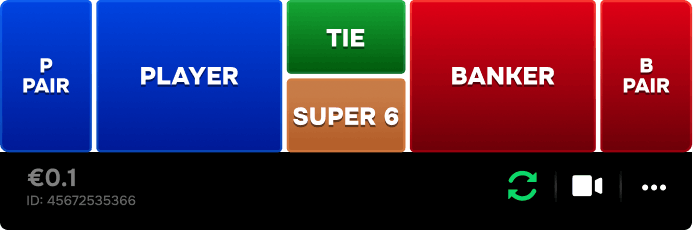
The total bet placed on the table is shown next to the table limits after placing a chip at any betting point.
The minimum betting limit is shown in the bottom left corner of the Multigame panel for each table.
The Chips screen allows you to select the value of chips you will use for betting. Only chip values that can be covered by your current balance are available.
The Repeat Bet button allows you to repeat the same bets from the previous round. Once you click/tap the Repeat Bet button, the Double Down and Undo buttons will be enabled.
The Double button doubles all bets placed. Each click/tap doubles your bets up to the maximum limit.
The Undo button removes the last bet placed. This button is only available while betting is active. Once bets are settled, you cannot undo or change them. Clicking/tapping the Undo button multiple times will remove bets one by one, with the most recent bet being removed first.
The star icon in the top corner of each Multigame panel anchors the table to the top of the Multigame table list. Click or tap to anchor or unanchor the table at any time. When a game is anchored, the star appears gold.

To see the other options available for a specific table, click or tap the Table Settings icon.
A drop-down menu opens that includes the following options:
- Pin table : Click or tap to pin a table to the top of the list and remove it from the best streak ranking. You can unpin it at any time.
- Table boundaries : Click or tap to see the boundaries of that table.
- Join the table : Click or tap to join the table and play in full view.
- Hide table : Click or tap to hide the selected table from the current table list. You can show it again through Settings .
When the timer runs out, the cards are dealt.
Once the game result is determined, the tables where you won are highlighted. The payout is calculated based on the types of bets placed.
Video transmission management
Click or tap the Video icon to turn video streaming on or off on any table.
You can only stream video to one table at a time. This table is automatically placed at the top of the window. If the video is muted, use the mute button to unmute it.
Game settings
Click or tap the Settings button in the Multigame window to open the Game tab .
From here you can adjust your game preferences, for example:
- Side bets
- Grid-only view
- Additional statistics
- Topics of the bookmarks
Additionally, under the Game tab you can hide or show the tables in the current table list in Multigame.
Light/dark mode markers
Bookmarks are displayed in light mode by default. You can click or tap the Light/Dark theme button to toggle dark mode on or off.
Manage Road Statistics
In Multigame mode, you have two display options for the baccarat table statistics: Big Road or Derivatives .
Click or tap the Roads button to switch between the two. By default, Big Road is displayed for all baccarat tables.
Menu items in Multigame
- Lobby
- Cashier (if applicable)
- Player history
- Baccarat game help : includes a guide to Multigame mode.
- The Settings button opens the settings window that allows you to adjust your preferences:
- Click/tap the Full Screen button to activate Full Screen mode. To exit this mode, click/tap the button again or press the Esc key on your keyboard.
On mobile devices, you'll find these items under the Menu .
Return to player
The optimal theoretical return to player (RTP) in Mega Baccarat is 98.79% , based on the optimal strategy for the Player's bet.
| TYPE OF BET | Return to player |
|---|---|
| Player | 98.79% |
| Banking | 98.54% |
| Draw | 95.00% |
The theoretical RTP for side bets is:
| TYPE OF BET | Return to player |
|---|---|
| Player's partner | 97.00% |
| Banking couple | 97.00% |
Game statistics
Click or tap the Statistics button to view more detailed statistics from up to 500 previous mega-rounds.
Tracking grids
Baccarat trends and streaks are recorded on "grids." These pictorial representations of past round results and other statistics related to the current shoe can serve as a guide and help you predict the results of upcoming rounds. Past game results do not guarantee or influence future results.
A tracking grid is started when the first round of play for the first shoe is dealt and continues until the cut card is dealt. When the last hand for the shoe is dealt, all records in the current tracking grid are erased.
When a new shoe is started, the process begins again from the beginning.
There are five traditional grids available:
- Big Road
- Big Eye Boy
- Small Road
- Cockroach Road
- Bead Plate
Big Road
The Big Road is the main tracking grid from which all others are derived.
Symbols of the Big Road:
| Icons |
 |
 |
 |
 |
 |
 |
|---|---|---|---|---|---|---|
| Meaning | The player wins | The house wins. | Win the tie after the bench | 2 consecutive draws | The player's partner wins. | The Bank Couple wins |
When the shoe is started, the first result is recorded in the top left corner of the Big Road. If the next result is from the same side as the first, it is recorded below. Otherwise, a new column is started, and this process continues throughout the shoe. In this way, the Big Road becomes a series of columns of empty circles (blue for the Player and red for the Banker).
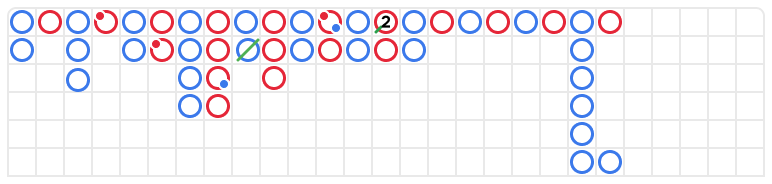
In Big Road, a tie is not shown in a separate square, but rather as a green line crossing the last result. If there are several ties in a row, a small number is shown next to the green line representing the number of ties. If a tie occurs before there has been a result in favor of the Player or the Banker, the green tie line is shown in the top left corner of the grid, and when the first result in favor of the Player or the Banker is known, the circle is shown in that same square, below the tie line.
If the Player or the Banker wins more than six times in a row, it's called "the dragon." This is the origin of a very popular baccarat strategy: "follow the dragon" and taking this trend into account when placing bets.

Derived grids
The Big Eye Boy , Small Road , and Cockroach Road grids are derived from the Big Road grid and capture various patterns. These derived grids function as "predictive grids," indicating whether patterns have been identified.
The derived grids are constructed with red and blue symbols: empty circles for the Big Eye Boy, filled circles for the Small Road, and diagonal bars for the Cockroach Road.
The red and blue symbols do not correspond to the Bank or the Player. Red indicates that there is a pattern, and blue indicates that the shoe is "variable" and does not follow any pattern.

The derived grids do not start at the beginning of the shoe. They start with the hand following the first hand in the second, third, and fourth columns of the Big Road:
- In Big Eye Boy : the second result in the second column.
- In Small Road : the second result in the third column.
- On Cockroach Road : the second result in the fourth column.
Once a derived grid has been started, an additional red or blue symbol is added to that grid after each hand.
Click or tap on any derived grid to expand its content.
Bead Plate
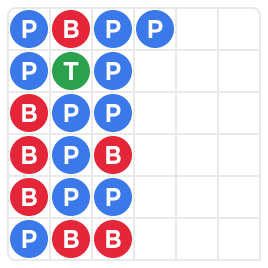
The Bead Plate is an exact representation of each shoe hand. Ties are shown in a separate box on the Bead Plate and are marked with a green circle.
| Icons |
 |
 |
 |
|
|
|---|---|---|---|---|---|
| Meaning | The player wins | The house wins. | Win the tie | The player's partner wins. | The Bank Couple wins |
The first symbol is displayed in the top left corner of the grid, which fills vertically downwards along the six squares of the column. A new column begins once the previous column is completed, regardless of the outcome of each hand.
By clicking or tapping the Statistics area of the Bead Plate, you will see the results, represented by letters, which correspond to the winning results (Player, Banker, Tie) or by numbers that correspond to the value of the winning hand.
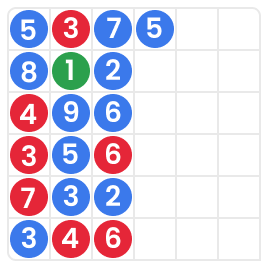
Consult tracking grid (Ask the Player, Ask the Bank)
Consulting the tracking grid helps players determine the outcome of the next round. It displays trends for the Big Road, Big Eye Boy, Small Road, Cockroach Road, and Bead Plate if a Player or Banker result is added.
Click or tap the Ask Player or Ask Bank button to see the trends, if the next result would be a win for the Player or the Bank, respectively.


The button symbols represent the most recent symbol from each derived grid.
Navigation controls
The Lobby button can be pressed at any time during any game. It allows you to easily switch tables, select any other live game, or leave the table. You won't be removed from your current table until you've selected the new table you wish to join. You can use the Lobby to browse other games while remaining at your current table. When on the Lobby page, click/tap the Back to Game button to exit the Lobby page and return to your open table.
Multi-table game
Join multiple game tables at once in the same browser window!
After accessing a game table, press the +TABLE button in the game and choose up to four tables to join, or go to the LOBBY and use the +TABLE button next to your preferred tables to join them.
Note: Some tables may not offer multi-table play mode and may not display the +TABLE button.

Once you have joined several tables, you will be able to resize the browser window as a whole, but not each game table separately.
To leave a table, simply click or tap the X button. Leaving a table does not affect your participation in other tables.
When you join the same table from a different device or browser, you'll automatically leave the table on the first device. If you click directly on a table's icon instead of the +TABLE button, you'll switch tables without adding a new one.
Clicking or tapping the Chat button opens the chat window. You can talk to the dealer and other players. The dealer will communicate directly with you and answer any questions related to the game.
If you need to speak with our Live Support service , select the relevant chat room by clicking/tapping the Support button and you will receive help in a private chat.
Customer Support staff constantly monitor chat messages. Players who misuse the chat, insult the dealer or other players, or use inappropriate or offensive language may have their chat privileges revoked.
The Volume Control button will bring up the slider that lets you adjust the volume of the table's sound. Click/tap the Volume Control button to mute the game. To unmute the sound, click/tap the Volume Control button again.
Click/tap the History button to open a window showing details of your gameplay activity. By default, today's history will open.
Simply select a game round from the list to see the details, from game round information to betting information.
The game's Help button opens the help window.
The Settings button opens the settings window that allows you to adjust your preferences:
On the General tab, you will find the following settings available:
- Video streaming on/off
- Adjust video quality
- Adjust video sounds
- Adjust the game's sound effects
In the Game tab you will find the following settings:
- Show/Hide betting statistics
- Show/hide the total number of hands on the betting board
- Activate/deactivate Dark Bookmarks mode
The hand totals are hidden by default on the betting board.
Clicking or tapping the Classic View button will switch the game view to classic mode, where the video is displayed within a small frame. Below the video, the virtual table with graphic cards for each side is available.
If your internet connection is slow or unstable, the game interface may automatically switch to classic mode. In this case, the video will automatically adjust to a low resolution .
Click/tap the Full Screen button to activate Full Screen mode. To exit this mode, click/tap the button again or press the Esc key on your keyboard.
In portrait mode on mobile, click or tap the Immersive icon to switch to the immersive game view that hides the grids.
Subtitles
The subtitles may not be entirely accurate. Please refer to the game's user interface information as the primary source.
Invalid throws
The dice shaker must spin for at least 7 seconds after the last result was determined.
If the throw is not confirmed as valid, it is called a “void throw” .
A "vote run" is considered to have occurred if:
- The agitator spins for less than 7 seconds.
- There's a die stuck on the edge.
- There is a physical failure affecting the tilting device.
- There is a mechanical failure affecting the agitator or the dice.
In the event of a "void run" , a new run is activated following our standard operating procedures.
Your bets remain until a valid roll is made.
Shuffle and change cards
When the cut card is removed from the shoe and the game round is over, the cards are shuffled.
If the cut card appears during the game, it is removed. The dealer informs the other players that this is the last hand in the shoe and the game ends. Once the hand is complete, no more cards are dealt until the shoe is changed or the cards are shuffled.
The cards are either shuffled by a shuffler on the shuffling table or shuffled by the dealer, depending on the procedure.
The shoe change procedure can be initiated before removing the cut card at the sole discretion of the person in charge on duty.
The chart change procedure is carried out once every 24 hours or in the following cases:
- The table has been opened after a period of inactivity.
- Video streaming was not available on the table.
- More than three cards fall to the ground during the game round.
- There is a letter with a defective barcode on the shoe.
Game problems
If an error occurs in the game, the game process, or transactions, the round will be temporarily paused and the turn manager will be notified. You and the other players will be informed via an on-screen notification explaining that the problem is being investigated.
If the error can be resolved immediately, the round will continue as normal. If it cannot be resolved immediately, the round will be canceled and the initial bets will be refunded to all players who participated in the round.
If you wish to discuss any matter related to the game, please contact Live Support referencing the game ID number .
Disconnection policy
Pragmatic Play's live casino services are provided via the Internet, so they may sometimes disconnect.
After losing your connection , check your winnings in the History window and, if you have any questions related to the game outcome, contact the game's live support or the casino's customer service and provide them with the game ID.
The maximum winnings per game are COP 350,000,000 or 10,000 times the stake, whichever comes first. Additional limits may apply depending on the provider.
Last modification date: 4/22/2026