One Blackjack
Introduction
ONE Blackjack is a version of the classic Blackjack game where players compete against the dealer, not each other. The game allows for an unlimited number of players at a table with up to seven seats.
The goal of blackjack is to get a card value higher than the dealer's, without ever going over 21. The best hand is Blackjack, which is when the value of the first two cards dealt adds up to 21.
Game settings
- It is played with 8 standard decks of 52 cards.
- The dealer has to ask for a card with 16 or less and stand at 17.
- Double down with any two starting cards.
- Double down after splitting, except when splitting aces.
- When you fold, you receive only one card.
- Split two initial cards of the same value.
- You can only divide once per hand.
- Aces can be split.
- You can't ask for a card with split aces.
- Charlie of six cards.
- The possibility of insurance with an open ace is offered.
- Blackjack pays 3 to 2.
- The insurance pays out 2 to 1.
- If there is a tie between the hands, the round is called a Push.
How to play
To play, select your bet amount and place it in your preferred betting slots. You can place or modify your bets until the betting timer runs out.
Once the betting timer has finished, the dealer deals one card face up to each seat, starting with the seat to their left and continuing to the next seat until reaching the dealer. A second card is then dealt face up to each seat, but the dealer receives their card face down.
If the value of your two initial cards adds up to exactly 21, you have blackjack.
Next, you will be offered the opportunity to improve your hand and choose one of the following decision options : hit, stand, double down or split, starting from the first seat to the left of the dealer to the last seat in a clockwise direction.
Once all decisions have been made, the dealer reveals the hidden card and deals the necessary additional cards, following the rule that the dealer must ask for a card until reaching 16 and standing on 17.
If the dealer's upcard is an ace, you can buy insurance to offset the risk of the dealer having blackjack. When the time to place an insurance bet has expired, the dealer's hand is checked for blackjack. If they have blackjack, the game round ends. If they don't, the game round proceeds to the Decision Options phase .
Value of the cards
The game is played with 8 standard decks of 52 cards. The card values in Blackjack are as follows:
- Cards 2 through 10 are worth the value they indicate.
- The figures (jacks, queens and kings) are worth 10.
- Aces are worth either 1 or 11, whichever is more favorable to the hand. Note that a soft hand includes an ace worth 11.
7♣ + 4♦ = 11
5♣ + 10♠ = 15
K♥ + Q♣ = 20
A♣ + 5♥ = 6 or 16
A♥ + 10♠ = Blackjack
The suit of the cards is irrelevant in the main game of Blackjack.
Side bets
This Blackjack game also includes optional side bets: 21+ 3 , Bust Bonus , Perfect Pairs (PP), and Crazy 7. You have the chance to win on any side bet whether you win or lose your main Blackjack bet. To place side bets, you must first place a main bet.

The Twenty-One Plus Three (21+3) side bet gives you the chance to win if your first two cards and the dealer's upcard form any of the following winning combinations (very similar to those in poker), each with a different payout:
-
Three of a kind : three identical cards (for example, three aces of hearts)
-
Straight flush : three consecutive cards of the same suit (for example, 10, jack and queen of spades)
-
Three of a kind : three cards of the same rank but different suits (for example, queen of hearts, queen of diamonds, and queen of clubs)
-
Straight : three cards in numerical sequence but of different suits (for example, an ace can be used to make a straight of ace, 2 and 3 or a straight of queen, king and ace)
-
Flush : three non-consecutive cards of the same suit (for example, 2, 6 and king of clubs)
Winning side bets are displayed immediately when the first two cards are dealt to each hand. If your hand includes two winning combinations, only the highest one will be paid.
The Bust Bonus side bet gives you the chance to win if the dealer busts, meaning the total value of the dealer's hand is greater than 21. The payout depends on the number of cards the dealer busts:
-
It is passed with 8 cards or more
-
It is passed with 7 cards.
-
It is passed with 6 cards.
-
It is passed with 5 cards.
-
It is passed with 4 cards.
-
It is passed with 3 cards.
If your initial hand has blackjack, your Bust Bonus bet is returned.
The Perfect Pairs (PP) side bet gives you the chance to win if your first two cards form a pair. There are three types of pairs, each with a different payout:
-
Perfect pair : two identical cards (for example, two queens of hearts)
-
Pair of colors : two cards of different suits but the same color (for example, a 2 of hearts and a 2 of diamonds)
-
Mixed pair : two cards of different suits and colors (for example, a 2 of spades and a 2 of diamonds)
Winning side bets are shown immediately when the first two cards are dealt to each hand. A winning hand with a perfect pair is unaffected by the dealer's hand.
The Crazy 7 side bet is evaluated based on the first three cards of the hand: the initial two cards and one additional card received after making the Hit or Split decision. The payout depends on the hand's card combination.
-
7-7-7 of the same suit : three identical 7s (e.g., three 7s of hearts)
-
7-7-7 of different suits : three 7s of different suits (e.g.: 7 of hearts, 7 of clubs, and 7 of diamonds)
-
7-7 of the same suit : two 7s of the same suit (e.g., two 7s of clubs)
-
7-7 of different suits : two 7s of different suits (e.g., 7 of clubs and 7 of diamonds)
-
7 : a single 7 of any suit (e.g., 7 of spades)
When you split a hand with two 7s and the next card dealt to the first hand is a 7, it counts as the third card.
If the dealer checks for blackjack and does have it, the third card that could result in the 7-7-7 combination is not dealt.
Bet
The table name indicates the table you are currently playing at, and the Table Limits show the minimum and maximum bets allowed at that table.
Click or tap Table Limits to view Payouts and Limits , including minimum and maximum limits and payout odds for each type of bet, or open it directly from the menu.
The Game Information Indicator tells you about the game's status.

You can place bets and modify your bets while the timer is visible on the screen.
The Chips screen allows you to select the value of chips you will use for betting. Only chip values that can be covered by your current balance are available.

Click or tap the ALL SIDE BETS button to cover all types of side bets at once. Bets will be placed using the selected chip value.
ALL SIDE BETS
The Repeat Bet button allows you to repeat the same bets from the previous round. Once you click/tap the Repeat Bet button, the Double Down and Undo buttons will be enabled.

The Double button doubles all bets placed. Each click/tap doubles your bets up to the maximum limit.

The Undo button removes the last bet placed. This button is only available while betting is active. Once bets are settled, you cannot undo or change them. Clicking/tapping the Undo button multiple times will remove bets one by one, with the most recent bet being removed first.

The Balance indicator shows your available funds and currency. Your balance must be sufficient to cover all bets placed.
Balance
1000.00 COP
If your balance is not updated (after betting, losing or winning), refresh the game.
The Cashier button will open the Cashier window for deposits and withdrawals. On mobile devices, the Cashier button is available in the game menu.
The Total Bet indicator shows the total value of all bets placed in the current game round.
Total bet
10.00 COP
All game rounds are identified by a game ID number . The Time indicator displays the current local time.
12:36 ID: 1234567890
Use the item ID number as a reference (or take a screenshot of the item number) if you have any questions and want to contact customer service.
Decision options in Blackjack
The value of your hand is displayed on the screen next to your seat. When it's your turn to make a decision about your hand, your seat will be highlighted. The timer will show you how much time is left to select an option.

The icon for the option you select will be displayed next to your seat.

If your first two cards are an ace and a 10, a jack, a queen, or a king, you have a natural blackjack, the best hand in the game. You don't have to make any decisions.

Stand : No more cards are dealt. This option is usually chosen when you are satisfied with the value of your hand. If you do not select any option within the allotted time, the Stand option is automatically selected.

Hit : An additional card is dealt to add value to your hand. You can hit more than once before you decide to stand because you are satisfied with the value of your hand or until the value of your hand equals 21. If you reach 22 or more, you automatically lose the bet for that hand.

Doubling down : Your bet is doubled and a single additional card is dealt. After doubling down, no further options are offered for the hand.
When the Fold option fails and is canceled, the decision will be to Ask.

Split : If your initial hand consists of a pair or two cards of the same rank, you can split the hand into two separate hands, each with an independent bet equal to the main bet. A second card is then dealt to each hand, and you can decide whether to hit, double down, or stand on each hand.

However, when you split a pair of aces, you only receive one additional card. If you receive a 10-value card on top of a split ace, it counts as 21, not blackjack.
When the Divide option fails and is canceled, the decision will be to Stand Firm.
The Honest Decision function is activated if you do not select any option during the set time or in case of disconnection, and an option is selected automatically:
- Stand if the hand value is 12 or more and Hit if the hand value is 11 or less.
- If you do not respond to the Insurance offer , the No option will be automatically selected for your hands.
Automatic decisions
The Automatic Decisions feature lets you make decisions faster. It's available in Settings, under the Automatic Decisions tab. From there, you can enable Basic or Advanced Automatic Decisions .
Basic automatic decisions
The Basic Automatic Decisions feature allows you to configure the Auto Stand , Auto Hire , and Auto Insurance options and define rules about when to select the Split or Double option to tailor Automatic Decisions to your preferred playing strategy.
When activated, the Auto Stand option automatically selects Stand when your hand value is equal to or greater than the specified value. To activate this feature, turn on the slider and set the desired range of values for the option to apply. Note that this value cannot overlap with the value set for Auto Hire .
Automatic planting does not apply if:
- The Split option is activated; the initial cards form a pair that is within the range set for this option.
- The Double option is activated and the initial cards are within the range set in the option.
- Your hand is a “soft hand”.
After Auto-Plant is applied to your hand, you'll see an animated Auto-Plant icon next to your seat.

When activated, the Auto-Hit option automatically chooses to Hite when your hand value is equal to or less than the selected value. To activate this feature, turn on the slider and set the desired range of values for the option to apply. Note that this value cannot overlap with the value set for Auto-Stand .
Automatic ordering does not apply if:
- The Split option is activated; the initial cards form a pair that is within the range set for this option.
- The Double option is activated and the initial cards are within the range set in the option.
- Your hand is a “soft hand”.
After Auto-Order is applied to your hand, you'll see an animated Auto-Order icon next to your seat.

When activated, Double and Split function as exceptions to the Auto Stand and Auto Hit options , as decisions are made based on the hand's value. To activate them, turn on the slider and set the desired range of values for these options to apply.
If Automatic Insurance is activated , you can choose one of the following two options:
- Always accept the insurance offer (it applies to all occupied seats)
- Never accept the insurance offer (applies to all occupied seats)
If Automatic Insurance is activated with the Always On option, an animated Automatic Insurance icon will be displayed next to your seat.

Basic Automatic Decisions that have been activated in Settings will be automatically applied to Advanced Strategy charts, where applicable.
Activating Basic Automatic Decisions disables Advanced Automatic Decisions.
Advanced automated decisions
Advanced Automated Decisions allow you to configure a complete set of customizable rules to cover all possible game scenarios. Once defined, these rules allow you to play automatically based on your preferred decisions.
You can modify the Advanced Automated Decisions to suit your preferences using the provided buttons. Once you've finished customizing them, activate the toggle switch. Select the actions you want to be taken in each situation and define the values on the chart by clicking or tapping them.
To ask : to take a letter

Stopping : ending the round of play

Divide : divide into two hands

Double down/Hit : Double the bet and if that's not possible, hit.

Double down/Stand : Double the bet and if that's not possible, stand.

The settings selected for Automatic Decisions during a game round will be applied to the next game round you participate in.
Activating Advanced Automatic Decisions disables Basic Automatic Decisions.
Statistics
The Statistics window displays various statistics of the current game round in real time.
When the decision-making timer ends, the total number of players participating in the current game round is displayed.
When the decision timer starts, this number decreases, showing the number of players who still need to make a decision and statistics on the players' decisions. Each option is indicated with a percentage, reflecting the distribution of decisions made during the current decision phase.
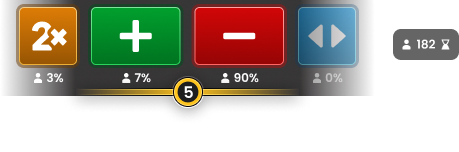
When the decision-making timer ends, the most selected decision is highlighted, along with the number of players who selected it.
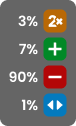
After the round is completed, the number of players who have won appears next to the Winners List .

Sure
If the dealer's first card is an ace, you can buy insurance to offset the risk of the dealer having blackjack.
Another timer starts to place the insurance bet. The insurance bet amount is half your initial bet and pays 2 to 1 if the dealer's second card is worth 10.
Click or tap Yes to purchase insurance for all your hands. If you do, an insurance icon will appear next to each insured hand.

Click or tap No if you do not want to purchase the insurance. If you do not make a decision within the specified time, the default option is No.

The percentage shown below both insurance decisions reflects real-time statistics of the decisions made by players regarding whether to purchase insurance.
When the timer runs out, the dealer reveals whether they have blackjack. If the dealer has blackjack, the game round ends and insured hands are paid out accordingly.
If the dealer doesn't have blackjack, the game round continues. Insurance bets are lost, but you still have a chance to win the round with your own hand.
Game result
Once all hands have been settled, the dealer's hand is compared to the other hands to determine the game's outcome. Your total winnings are displayed in the prize message on the screen.
You win when the final value of your hand is closer to 21 than the dealer's or if the dealer busts.
All winning hands are marked with the Win icon .

Hands containing blackjack (two initial cards totaling 21) automatically win unless the dealer also has blackjack, which would result in a push. Note that blackjack beats any hand totaling 21 made by splitting aces or by more than two cards.
If the value of your hand is equal to that of the dealer's hand, the game round ends in a push and you get your bet back.

Hands that go over 21 automatically lose and are indicated with the "Too Much" icon . This does not apply to the dealer's hand.

Hands with a value lower than the dealer's hand lose and are marked with the No Win icon .

All individual hands containing six cards with a total value of 21 or less win thanks to the rule known as the "Six Card Charlie".

When the game round is over, all the cards on the table are collected and discarded, and the betting is opened for the next game round.
The Winners List is displayed at the end of each round and shows the names of all players at the current table who won in the last round. The payout amounts are shown in your local currency.
14 HAVE WON €4,526,065
€700,000 Poker_face
€600,950 Tardisblue
€580,000 MrLuckWong
€570,000 Rouletter2
€534,000 chezter1987
€521,000 Pernyamaa
€520,000 Kazanbas12
€500,000 LuckyPlayer
€42 Geralt
€21 MegaSheer
€18 Jeeves75
€14 Trevor9
€12 Bacc_rat
€8 SSC_Miami
Payments
Winning and tied hands are paid out as follows:
- Winning hands pay 1 to 1.
- Winning hands that have Blackjack pay 3 to 2.
- Insurance bets that win pay 2 to 1.
- In case of a tie or Push, the bet is returned to your balance.
Side bets:
21+3
| COMBINATION | PAY |
|---|---|
| Trio of the same stick | 100 to 1 |
| Color ladder | 40 to 1 |
| Trio | 30 to 1 |
| Ladder | 10 to 1 |
| Color | 5 to 1 |
BUST BONUS
| COMBINATION | PAY |
|---|---|
| It is passed with 8 cards or more | 250 to 1 |
| It is passed with 7 cards. | 100 to 1 |
| It is passed with 6 cards. | 50 to 1 |
| It is passed with 5 cards. | 9 to 1 |
| It is passed with 4 cards. | 2 to 1 |
| It is passed with 3 cards. | 1 to 1 |
PERFECT COUPLES
| COMBINATION | PAY |
|---|---|
| Perfect match | 25 to 1 |
| Colored couple | 12 to 1 |
| Mixed couple | 6 to 1 |
CRAZY 7
| COMBINATION | PAY |
|---|---|
| 7-7-7 of the same suit | 2000 to 1 |
| 7-7-7 | 500 to 1 |
| 7-7 of the same suit | 150 to 1 |
| 7-7 | 25 to 1 |
| 7 | 5 to 1 |
This information is also available in the Payments and Limits window .
Return to player
The optimal theoretical return to player (RTP) in Blackjack is 99.59% based on the initial bet.
The theoretical RTP for side bets is:
| TYPE OF BET | RTP |
|---|---|
| 21+3 | 96.30% |
| Bust Bonus | 94.12% |
| Perfect couples | 95.90% |
| Crazy 7 | 94.77% |
Navigation controls
The Lobby button can be pressed at any time during any game. It allows you to easily switch tables, select any other live game, or leave the table. You won't be removed from your current table until you've selected the new table you wish to join. You can use the Lobby to browse other games while remaining at your current table. When on the Lobby page, click/tap the Back to Game button to exit the Lobby page and return to your open table.
Clicking or tapping the Chat button opens the chat window. You can chat with the game host and other players. The game host will communicate directly with you and answer any questions related to the game.
If you need to speak with our Live Support service , select the relevant chat room by clicking/tapping the Support button and you will receive help in a private chat.
Customer Support staff constantly monitor chat messages. Players who misuse the chat, insult the host or other players, or use inappropriate or offensive language may have their chat privileges revoked.
The Volume Control button will bring up the slider that lets you adjust the volume of the table's sound. Click/tap the Volume Control button to mute the game. To unmute the sound, click/tap the Volume Control button again.
Click/tap the History button to open a window showing details of your gameplay activity. By default, today's history will open.
Simply select a game round from the list to see the details, from game round information to betting information.
The game's Help button opens the help window.
The Settings button opens the settings window that allows you to adjust your preferences:
- Video streaming on/off
- Adjust video quality
- Adjust the game's sound effects
Click/tap the Full Screen button to activate Full Screen mode. To exit this mode, click/tap the button again or press the Esc key on your keyboard.
Subtitles
The subtitles may not be entirely accurate. Please refer to the game's user interface information as the primary source.
Shuffle and change cards
When the cut card is removed from the shoe and the game round is over, the cards are shuffled.
If the cut card appears during the game, it is removed. The dealer informs the other players that this is the last hand in the shoe and the game ends. Once the hand is complete, no more cards are dealt until the shoe is changed or the cards are shuffled.
The cards are either shuffled by a shuffler on the shuffling table or shuffled by the dealer, depending on the procedure.
The shoe change procedure can be initiated before removing the cut card at the sole discretion of the person in charge on duty.
The chart change procedure is carried out once every 24 hours or in the following cases:
- The table has been opened after a period of inactivity.
- Video streaming was not available on the table.
- More than three cards fall to the ground during the game round.
- There is a letter with a defective barcode on the shoe.
Game problems
If an error occurs in the game, the game process, or transactions, the round will be temporarily paused and the turn manager will be notified. You and the other players will be informed via an on-screen notification explaining that the problem is being investigated.
If the error can be resolved immediately, the round will continue as normal. If it cannot be resolved immediately, the round will be canceled and the initial bets will be refunded to all players who participated in the round.
If you wish to discuss any matter related to the game, please contact Live Support referencing the game ID number .
Disconnection policy
Pragmatic Play's live casino services are provided via the Internet, so they may sometimes disconnect.
After losing your connection , check your winnings in the History window and, if you have any questions related to the game outcome, contact the game's live support or the casino's customer service and provide them with the game ID.
The maximum winnings per game are COP 350,000,000 or 10,000 times the stake, whichever comes first. Additional limits may apply depending on the provider.
Last modification date: 4/22/2026